
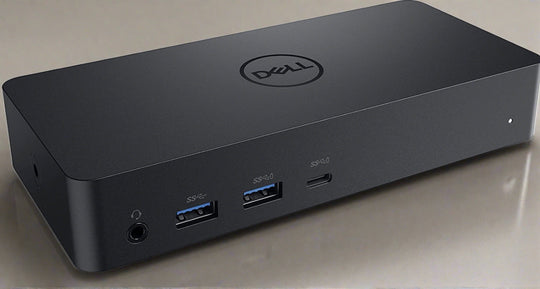
In the fast-paced world of technology, ensuring that your work setup is efficient and adaptable is essential. One of the key components in achieving this flexibility is a reliable docking station, particularly if you are using a Dell laptop. Docking stations allow for seamless connectivity, power management, and peripheral integration, making them indispensable for professionals who require an organized and effective workspace. This article outlines the top five Dell docking stations available in 2021, showcasing their key features and benefits to help you make an informed decision.
Dell WD19 180W Docking Station
The Dell WD19 180W is a standout option for those seeking a powerful and versatile docking solution. Designed for ultimate connectivity, this docking station supports a wide range of devices and peripherals, making it suitable for diverse work environments.
- 180W power delivery for charging powerful laptops.
- Multiple ports including USB-C, USB-A, HDMI, and DisplayPort for comprehensive connectivity.
- Supports up to three displays, enhancing productivity and multitasking.
- Easy firmware updates and management through Dell’s firmware utility.
For those looking to buy dell docking station, the WD19 is an excellent choice, providing robust features and compatibility.
Dell D3100 Docking Station
A more budget-friendly option, the Dell D3100, offers essential features for everyday use. It is perfect for users who need to connect multiple devices without the high power output requirements.
- USB 3.0 support for fast data transfer.
- Triple display support: one 4K and two Full HD screens.
- Compact design, saving desk space while providing necessary functionality.
- Plug and play installation, simplifying the setup process.
This docking station provides an excellent balance between cost and capability, ideal for anyone needing reliable connectivity without breaking the bank.
Dell WD19TB Thunderbolt Dock
For users who require high-speed data transfer and ultra-fast charging, the Dell WD19TB is equipped with Thunderbolt 3 technology. This makes it perfect for power users and professionals who handle large data files regularly.
- Thunderbolt 3 port for data transfer speeds up to 40Gbps.
- Support for up to four displays, including dual 4K monitors.
- 130W power delivery for rapid charging of laptops.
- Backward compatible with non-Thunderbolt USB-C devices.
The WD19TB is an optimal choice for those who need top-tier performance and speed, ensuring that all tasks are completed efficiently.
Dell Universal Dock – D6000
The Dell Universal Dock D6000 is an adaptable solution for users with a mix of USB-C and USB-A devices. Its universal compatibility makes it a versatile choice for both home and office environments.
- Universal compatibility with both USB-C and USB-A ports.
- Support for up to three 4K displays simultaneously.
- Dual 4K display output through USB-C, with third monitor via USB-A.
- Plug and play functionality with easy setup.
The D6000 is particularly beneficial for environments where multiple device types need to be connected seamlessly.
Dell Thunderbolt Dock WD22TB4
As one of the latest additions to Dell’s docking station lineup, the WD22TB4 offers cutting-edge features for those needing a top-of-the-line docking solution. It combines the latest technology with user-friendly design.
- Thunderbolt 4 technology, supporting data transfer speeds and power delivery.
- Modular design, allowing for easy upgrades and customization.
- Support for multiple displays, including four 4K monitors or dual 8K displays.
- Advanced security features to protect sensitive data.
The WD22TB4 is perfect for tech enthusiasts and professionals seeking the most advanced docking solutions available in 2021.
Choosing the right docking station can greatly enhance productivity and streamline workflows. Each of these Dell docking stations offers unique features tailored to various user needs, ensuring there is a perfect match for everyone. When planning to buy dell docking station, consider the specific requirements and compatibility needed to achieve optimal performance in your workspace.