
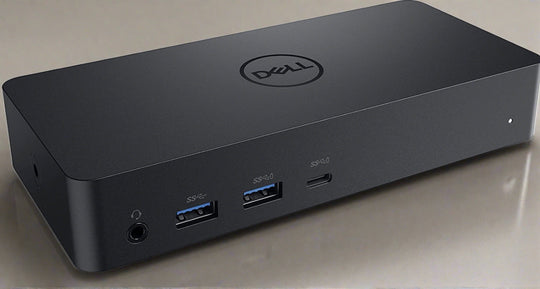
In today’s fast-paced digital environment, a docking station is an essential tool for enhancing productivity and connectivity. Dell docking stations, renowned for their reliability and versatility, cater to a wide range of professional needs. Whether you are a remote worker, a business professional, or a tech enthusiast, understanding how to choose the right Dell docking station can significantly impact your workflow efficiency. This guide provides comprehensive insights into selecting the most suitable Dell docking station for your requirements.
Understanding Your Needs
The first step in selecting the ideal docking station is to assess your specific needs. Consider the following factors to make an informed decision:
- Device Compatibility: Ensure the docking station is compatible with your laptop or desktop. Dell offers a variety of docking stations compatible with different models.
- Port Requirements: Evaluate the number and types of ports you need. Common ports include USB, HDMI, DisplayPort, and Ethernet.
- Power Delivery: Some docking stations can charge your laptop while in use, which is crucial for uninterrupted work sessions.
Types of Dell Docking Stations
Dell offers a range of docking stations tailored to meet diverse user requirements. Understanding these options can help you make a more informed choice:
USB-C Docking Stations
USB-C docking stations are popular due to their versatility and speed. They support a wide array of devices and offer rapid data transfer rates. If your laptop has a USB-C port, this option might be ideal.
Thunderbolt Docking Stations
For users requiring high-speed data transfer and multiple display outputs, Thunderbolt docking stations are a perfect fit. They offer enhanced performance and connectivity options, making them suitable for creative professionals and power users.
Traditional Docking Stations
These docking stations are designed for specific Dell laptop models and provide a dedicated connection interface. They are ideal for users who regularly switch between a desk setup and portability.
Key Features to Look For
When deciding to buy a Dell docking station, certain features can greatly enhance your experience:
- Dual or Triple Monitor Support: If multitasking is crucial for your work, consider a docking station that supports multiple displays.
- High-Resolution Output: Ensure that the docking station supports the resolution you need, especially if you work with graphics or video editing.
- Network Connectivity: An Ethernet port for wired internet connection can be vital for stable network performance.
- Audio Jacks: For users needing audio input/output, ensure the docking station includes the necessary audio ports.
Installation and Setup
Setting up a Dell docking station is generally straightforward. Follow these steps for a hassle-free installation:
- Connect the docking station to your laptop or desktop using the appropriate cable.
- Attach peripheral devices such as monitors, keyboards, and mice.
- Install any necessary drivers or software updates provided by the manufacturer.
- Adjust display settings and preferences according to your work requirements.
Final Considerations
Choosing the right Dell docking station involves balancing compatibility, features, and performance with your personal or professional needs. By considering the factors outlined in this guide, you can ensure a seamless integration into your workspace. Whether you prioritize connectivity, speed, or display capabilities, the right docking station can transform your desk into a powerhouse of productivity.
To explore a wide range of options and find the perfect fit, visit the extensive collection of Dell docking stations available online.